How to Create a Virtual Tour with Your Phone: A Guide to 3DGS and Spatial Reconstruction
Learn how to create immersive virtual tours using your smartphone, 3D Gaussian Splatting (3DGS), and spatial reconstruction workflows. Discover how Aholo 3D helps you build professional digital twins with guided mobile scanning.
Forget static 360-degree photo bubbles. The next generation of virtual tours has arrived on your smartphone, driven by 3D Gaussian Splatting (3DGS) and advanced Spatial Reconstruction.
In this tutorial, we’ll show you how to move beyond flat panoramas and create fully navigable digital twins using nothing but the phone in your pocket and the right computer vision tools.
The New Era of Mobile Virtual Tours: From Photos to 3DGS
For years, “virtual tours” meant stitching together wide-angle photos. While accessible, these “bubbles” lack true depth and motion parallax. When you move, the perspective doesn't shift — it simply warps.
Spatial Reconstruction changes the game. By using the sensors in your phone to calculate the exact geometry of a room, we can now build a 3D environment where users can naturally walk around corners and explore spaces freely.
What is 3D Gaussian Splatting (3DGS)?
3DGS is a breakthrough in Spatial Computing. Unlike traditional mesh-based models that struggle with fine details like hair, reflections, or transparent surfaces, 3DGS represents the world as a collection of Gaussian “splats.”
This approach enables cinematic-quality rendering while remaining lightweight enough to run smoothly on mobile devices and web browsers, making it an ideal standard for professional-grade virtual tours.
Step 1: Capturing High-Quality Data with Aholo 3D Guidance
In Geometric Reconstruction, the quality of your output depends entirely on the quality and coverage of your input data. For 3DGS, you need consistent overlap and multiple perspectives to eliminate blurry artifacts and floating geometry.
Instead of leaving users to move randomly, the Aholo 3D App provides a structured Algorithmic Guidance system that standardizes the capture process, making it repeatable and professional even for first-time users.
The Three-Layer Orbital Workflow
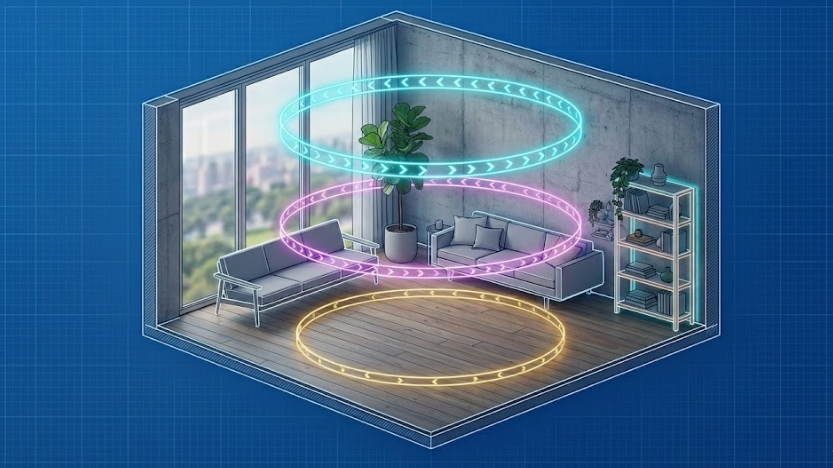
To ensure the mathematical integrity of the Spatial Reconstruction, Aholo 3D guides users through a specific three-layer orbital sequence. This is not just a simple rotation — it’s a systematic method designed to capture the full spatial volume of a room.
-
The Eye-Level Layer
Establishes the primary visual field and wall transitions. -
The Ceiling Layer
Captures upper-corner geometry, ceiling structures, and lighting fixtures. -
The Base Layer
Records floor-level details and furniture foundations.
By following these three guided rings, the computer vision engine receives enough parallax information to triangulate spatial points accurately.
Targeted Patch-ups for Seamless Results
Even with a complete orbital capture, certain regions — such as the space behind a sofa or inside a closet — may remain partially occluded.
Aholo 3D includes a dedicated Guided Patch-up phase that prompts users to identify and scan these blind spots. This ensures the final 3DGS model remains watertight and free from missing geometry that commonly appears in amateur smartphone scans.
Step 2: Processing and 3DGS Rendering
Once the structured capture is complete, the raw visual data enters the processing stage. This is where Spatial Computing transforms a sequence of images and sensor information into a coherent 3D environment.
Traditional workflows often require complex photogrammetry software and hours of manual alignment. With modern 3D Gaussian Splatting pipelines, the process becomes significantly more efficient.
The system uses recorded camera poses to initialize Gaussian points within 3D space. Because the capture follows the Three-Layer Orbital Workflow, the Geometric Reconstruction engine can resolve spatial coordinates with high fidelity, producing a virtual tour that feels physically grounded rather than visually projected.
Step 3: Customizing and Sharing Your Digital Twin
A virtual tour is more than a 3D model — it’s an interactive communication experience.
Once the Spatial Reconstruction is complete, you can further enhance the scene with interactive elements and deployment options.
Interactive Hotspots
Embed annotations, technical specifications, product information, or educational content directly into the 3D environment.
Vision-based Navigation
Allow users to move naturally through the reconstructed space, either by teleporting between viewpoints or walking continuously through the environment.
Cross-Platform Embedding
3DGS-based tours are optimized for web browsers, making them easy to share through a simple URL or embed directly into websites, landing pages, and online portfolios.
Why Aholo3D is the Professional Choice for Spatial Computing
The difference between a hobbyist scan and a professional-grade virtual tour comes down to Geometric Integrity.
Many mobile scanning apps prioritize convenience at the expense of accuracy, leading to warped walls, inconsistent scale, and drifting perspectives.
By enforcing a Structured Capture Workflow, Aholo3D prioritizes the foundational principles of Computer Vision and Spatial Reconstruction.
Whether you are documenting construction progress, preserving cultural heritage, or showcasing luxury real estate, the guided orbital workflow helps ensure reliable, high-quality reconstruction results without requiring expensive dedicated hardware.
FAQ: Mastering Smartphone Virtual Tours
Can I create a 3DGS tour without a LiDAR-equipped phone?
Yes. While LiDAR improves depth precision, 3D Gaussian Splatting relies heavily on visual overlap and camera pose estimation.
Aholo3D’s guided workflow helps users collect enough visual information for effective reconstruction using standard smartphone cameras.
How long does Spatial Reconstruction take?
The scanning process typically takes between 5–10 minutes depending on the size and complexity of the environment.
Processing time varies depending on available cloud or local rendering resources, but 3DGS workflows are generally much faster than traditional mesh-based photogrammetry pipelines.
Why is the Three-Layer approach better than simply spinning around?
Standing in one position and rotating only produces a panorama with limited depth information.
The Three-Layer Orbital Workflow introduces vertical and horizontal parallax, allowing the reconstruction system to observe objects from multiple heights and viewing angles — which is essential for accurate 3D geometry estimation.
Conclusion: Start Building Your Digital Twin Today
The barriers to creating high-fidelity virtual tours have rapidly disappeared.
You no longer need expensive laser scanners or specialized equipment to produce immersive digital twins. By combining the capabilities of modern smartphones with Aholo3D’s structured scanning workflow, creators can leverage the latest advances in 3DGS and Spatial Computing to generate immersive, geometrically accurate virtual experiences.
Download the Aholo 3D app today and begin building your first professional 3DGS reconstruction.